ITCH 1 Manual
Introduction
The In Transit Cleaning System for Hulls (ITCH) is a proactive cleaning system for removing early stage marine fouling from the hull of a ship during transit. It is aimed to be used regularly by the ships crew to prevent build up of fouling on the hull and optimize hull performance.
The system consists of a cleaning Robot connected to a Winch that gradually releases the Robot while it swipes a brush up and down the side of the hull. The Robot uses hydrodynamic principles to attach and balance itself on the hull using the water flowing around the ship. A rudder on the Robot is used to move the unit up and down the hull depending on data measured by its onboard sensors. The Robot has an onboard camera which documents the cleaning performance and the condition of the hull.
The system can be configured to work on different areas of the ship using a computer application that wirelessly connects to the robot over Bluetooth. The application can also update the firmware on the Robot and download its sensor data to check that everything is working as it should post cleaning.
By using harder brushes or configuring the system to more thoroughly clean the hull, the ITCH can also remove established fouling.
Areas defined as niche areas, the propeller and flat bottom are today not accessible by the Robot.
The video below gives a brief introduction to how the system works:
Safety Precautions
Prior to deployment
Deployment should only take place in calm weather when the speed of the vessel through water is 10-13 knots. The Robot should be deployed in a manner with minimal risk of impacting the hull above the water line. The operator should make sure that the towing line is not twisted around any bodily extremities as the sudden force when the Robot submerges is considerable.
Submerged Robot
Encountering unknown obstacles may occur during cleaning. It is therefore important that the operator maintains watch and applies good seamanship to ensure the operation is proceeding as planned. Should the Robot not operate according to plans the operations should be aborted and the Robot should be retrieved, inspected, and the operational parameters should be reviewed.
Towing line setup
The towing line supplied by Shipshave should be configured to reflect the overall length of the vessel. Prior to first use of the Robot, the towing line should be un-spooled by the operator and pulled towards the back of the ship to ensure that the towing line will not reach the propeller. Maintain 4 turns of the towing line on the drum of the winch to ensure there is enough friction.
When working with the towing line under tension the operator should keep the following in mind:
- Do not overload the towing line
- The towing line should not go over sharp edges
- Avoid shock loading the towing line whenever possible
- Keep the towing line away from all chemicals to prolong safe working life
- It is the operator's responsibility to use the towing line in a safe manner
Winch
The winch is electric with a rotating drum capable to exert a considerable force. When operating the winch, the operator should be mindful for moving parts and work from a safe distance. The operator should be alert and evaluate risks associated with potential machine faults. Avoid unessential personnel near the winch during cleaning.
Foreign objects
The operator should prevent accidental introduction of foreign objects close to the rotating part of the winch.
Electric cabinet
The operator must ensure that the door to the electric cabinet is always securely closed when connected to power and there is no danger for water ingress.
Preparations Before First Use
-
Make sure the people involved with setting up the ITCH have read through all documentation and has a thorough understanding of how the system works.
-
Ensure that the dedicated ITCH winch is securely fastened to the foredeck and has access to a power source. Plan which fairleads to use and make sure that there is a clear route for the rope to travel from the Winch which is free of objects which could harm the rope.
-
Verify that the Winch has been set up with the correct length of towing line by pulling it out and ensuring that it does not go beyond where the hull starts to narrow towards the aft. Check that the end of the towing line is firmly attached to the drum.
-
Review the hull and assess if obstructions on the hull can limit the travel of ITCH. A review of the hull drawings and pictures from dry docking is recommended. Take this into account when configuring the water depths the Robot should clean within, and the location of deployment and retrieval of the Robot.
Quick Guide Video
Configuration
Operating Instructions
-
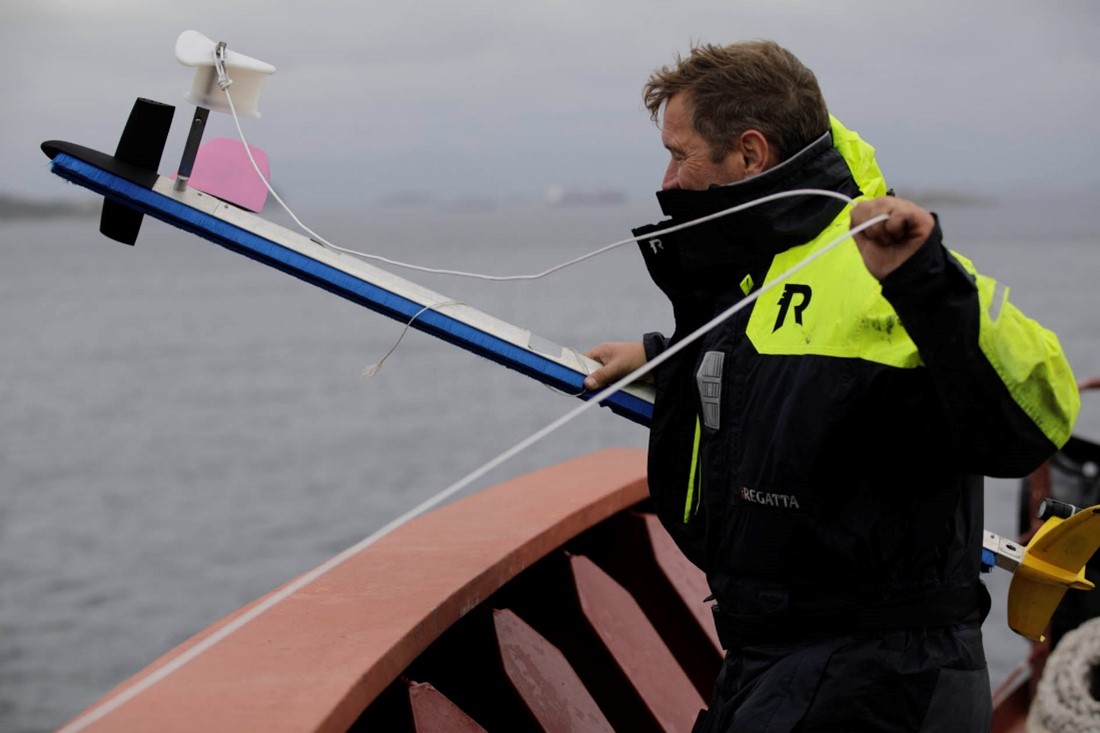
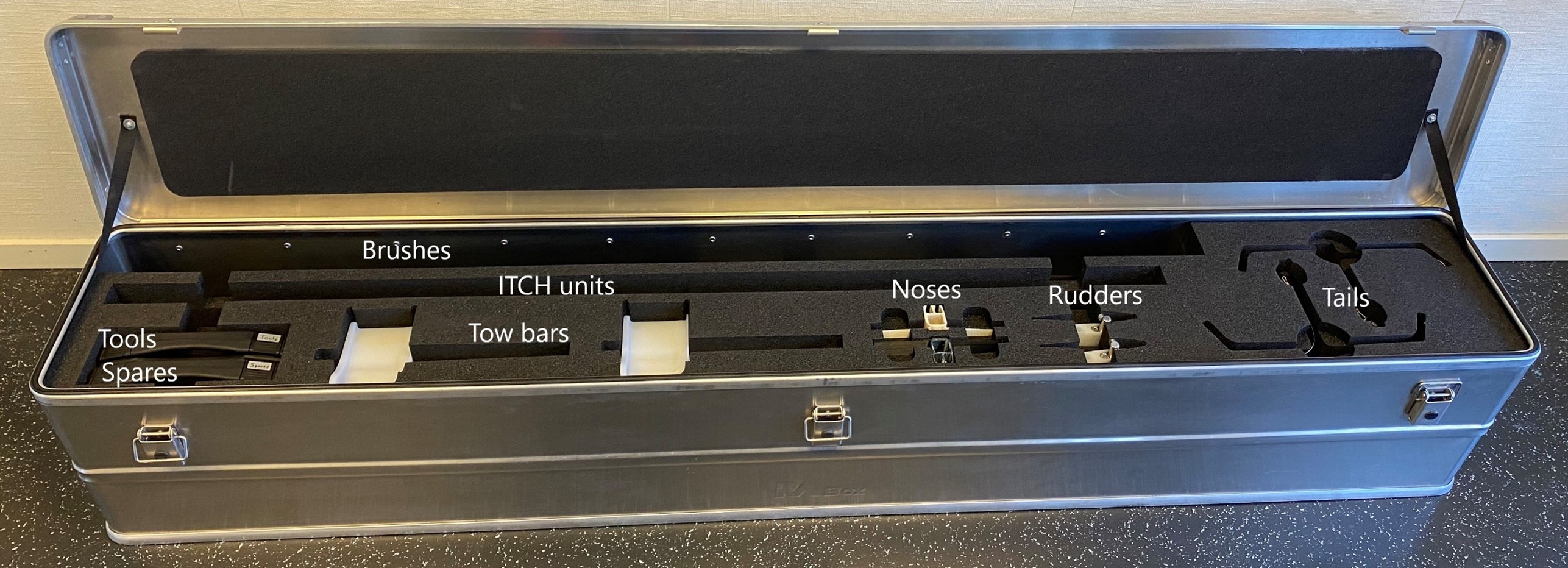
Assemble the ITCH using the tools and bolts provided in the boxes marked with TOOLS and SPARES. Fit the towbar pointing upwards with the brush facing the side to be cleaned. The same outrigger can be used for both sides of the hull by unscrewing the hex nut and attaching the tow-bar to the other side. The tow line should be tied to the towbar using a bowline knot.
-
Turn the Winch on and lead the tow line to a fairlead or otherwise. Avoid that the tow line goes over abrasive or sharp surfaces and avoid pinching. Thread a chaser ring supplied in the box marked with TOOLS and tie the ring to the railing. Limit the number of directional changes of the tow line to minimize friction. Inspect the tow line for damages and cut back excessively worn parts.
-
Turn on the Robot. A startup sequence will activate the rudder. The light in the charger port should be green. Within the first 20 seconds after powering the unit on, orient the device with with the towbar facing up. This will tell the Robot what starting position it should use for its rudder.
-
Turn on the camera. Set it to video mode and start recording.
-
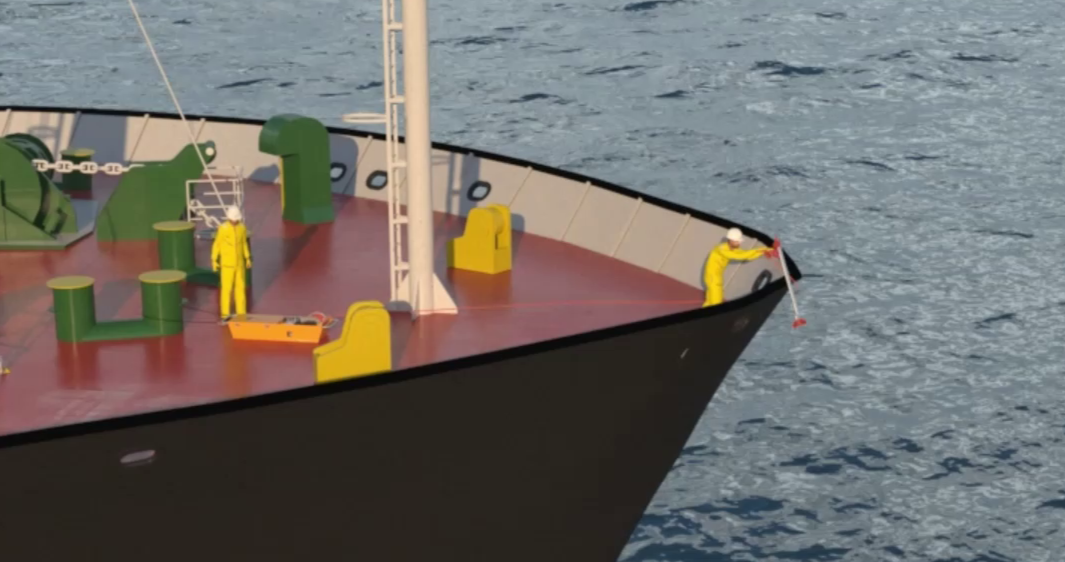
Verify that the vessel is doing 10-13knots, then deploy the ITCH Robot with full speed on the Winch until it reaches the surface of the water and you see the Robot diving into the water. If the vessel has a rounded and vertical bow, like typical bulk- or crude carriers, the ITCH Robot may be lowered from the fairlead. If the vessel has an elevated and protruding bow like a typical container or passenger ship, ensure that the Robot is deployed close to the hull. Avoid deployment in whitewater and waves.
-
Once the Robot has gone into the water and you can see it going up and down, turn the Winch into Auto Mode and set the speed based on how thorough you want the cleaning to be.
-
Keep constant watch during the operation of the Winch and the Robot and be ready to stop the operation in case of a disruptive event.
-
When the Winch has released the full length of the Tow-Line, switch the winch to Auto In and pull the unit back.
-
After the operation is completed, the Robot should be rinsed off in freshwater, dried then disassembled and placed back into its storage box.
Robot
Overview
The ITCH Robots primary function is to autonomously navigate vertically along the hull to remove fouling.
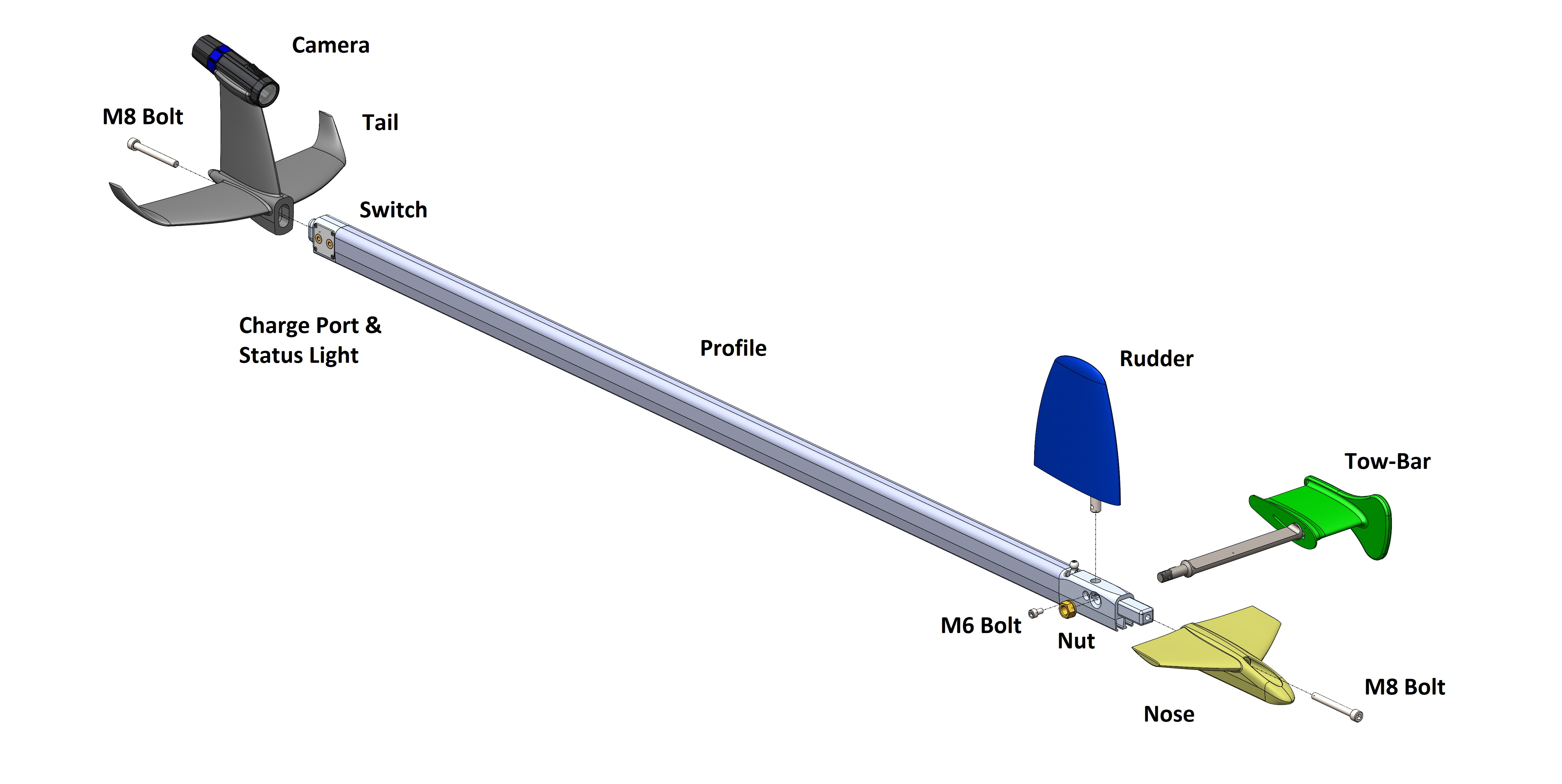
Below is a figure showing how the Robot looks and its different parts (not including brushes):
Assembly
The Robot can be assembled and disassembled to take less space during storage and support changing parts for different use cases or when replacing a damaged part. Below is a description of how to assemble a disassembled unit.
Parts required
- 1 ITCH profile
- 2 Brushes
- 2 M8 Bolts
- 1 Tail with camera
- 1 Nose
- 1 Tow bar with nut
- 1 Rudder with M6 bolt
- Security line
Assembly Sequence
- Slide the brushes into the profile
- Slide the nose over the brushes and fasten using the M8 bolt.
- Place the rudder on top of the rudder lever and secure using the attached M6 bolt.
- Screw on the towbar with the attached nut
- Screw on the tail to the charging point side of the profile using the second M8 bolt. Secure the camera to the profile using the security line.
Here is a video showing how it is done:
Operating Instructions
Turn Device On and Off
To switch the Robot on, you must pull the switch located opposite the status light in the Tail for a few seconds until you see the status light in the tail light up. To switch the device off again, you must pull the switch for 5-7 seconds until you see the status light go off.
During a normal startup sequence, the status light should start at blue, then quickly go over to a solid red. While red, the unit will initialize itself and go through a homing sequence to calibrate the position of the Rudder. If everything is successful, the status light will transition to a solid green. The unit is now ready to be used.
Status Light
Below is an overview of what operational status each status light color indicates:
| Color | Operational Status |
|---|---|
| Green | Everything ok and ready for cleaning |
| Solid Red | Something wrong, please restart the Robot |
| Blinking Red | Battery low |
| Solid Blue | Firmware update Mode |
| Blinking Blue | Download Data Mode |
Battery Charging
The Robot has an onboard battery which can be charged using the included charger which gets plugged into the charging port. It doesn't matter which orientation you plug in the connector. The charger has a status light that shows red when the robot is charging and green when the battery is full. You can also check the charge status of the battery by connecting to the Robot using the ITCH Application.
Camera
The ITCH Robot uses the Paralenz Dive Camera to document its cleaning performance. Please look at the following guide for more information on how it works. Camera Manual
Post Cleaning Evaluation
Download data from the ITCH via Bluetooth as described in the Application guide.
Remove SD card from camera and download video files to your computer.
Review results and make appropriate adjustments.